Statistik MenuMenu Statistic
Popularitas menu berdasarkan pesanan.Menu popularity based on orders.
Melihat seberapa sering menu dipesan dan total tamunya, dengan filter untuk perencanaan stok.See how often menus are ordered and their total guests, with filters for stock planning.
Alur PenggunaanUsage Flow
- Buka halaman Statistik Menu.Open the Menu Statistic page.
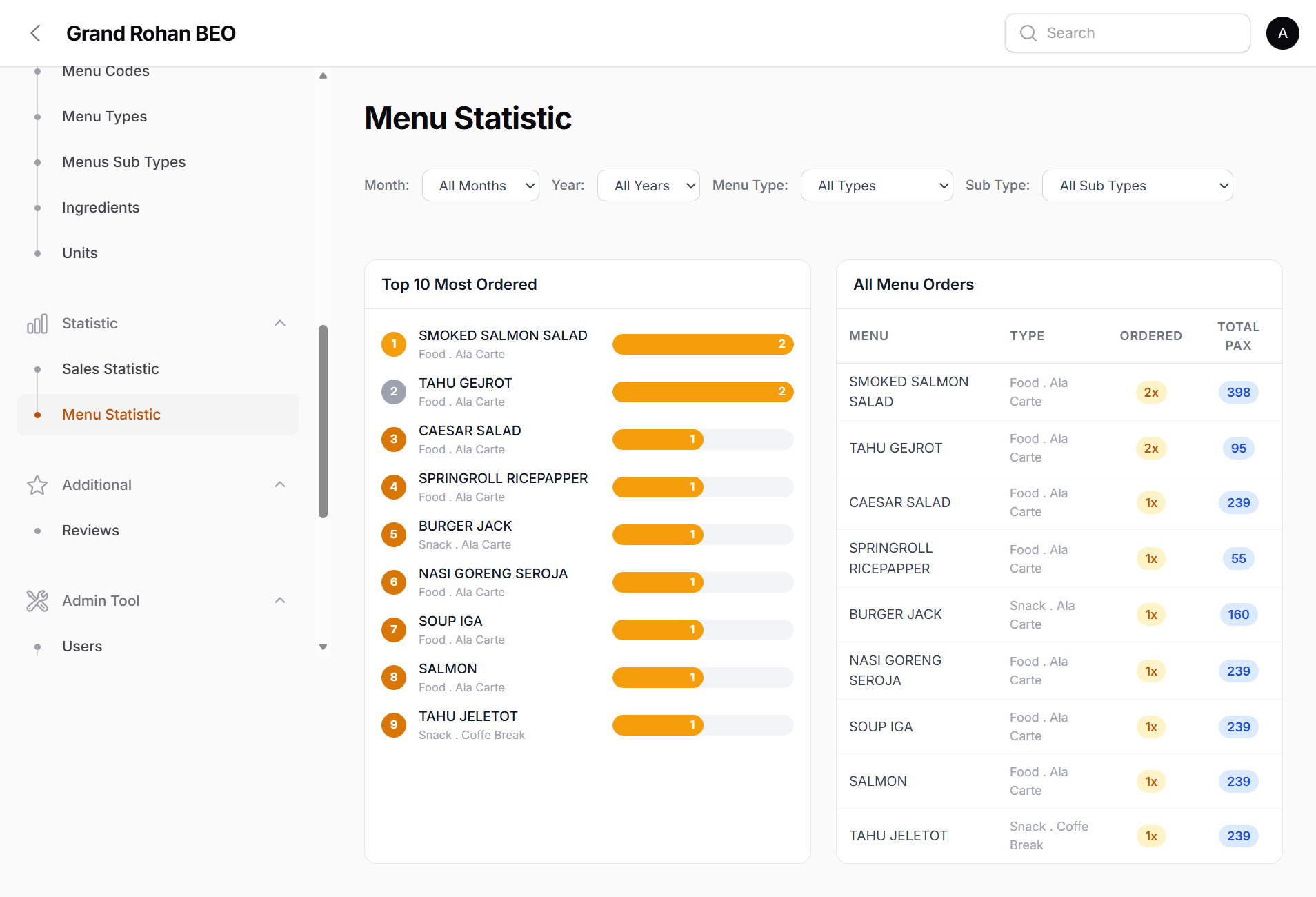
- Terapkan filter yang diinginkan.Apply the filters you want.
- Urutkan berdasarkan jumlah pesanan atau pax.Sort by order count or pax.
- Gunakan hasilnya untuk keputusan menu & bahan.Use the results for menu and ingredient decisions.
Data yang diisiData to fill in
- Total OrderedTotal Ordered: Berapa kali menu dipesan.How many times a menu was ordered.
- Total PaxTotal Pax: Akumulasi jumlah tamu.Accumulated guest count.
- FilterFilter: Tipe, subtipe, bulan, tahun.Type, subtype, month, year.